
Play the samples
Click the green flag ▶ to play. The cat dances to the rhythm.
Use it in your project
This button opens a new project with the extension.
To add it to a project you are working on:
- Open the Xcratch editor
- Click the "Add Extension" button at the bottom left
- Choose "Extension Loader"
- Enter this URL and click "OK"
https://0x48lab.github.io/xcx-strudel/dist/strudel.mjs
Shapes of blocks
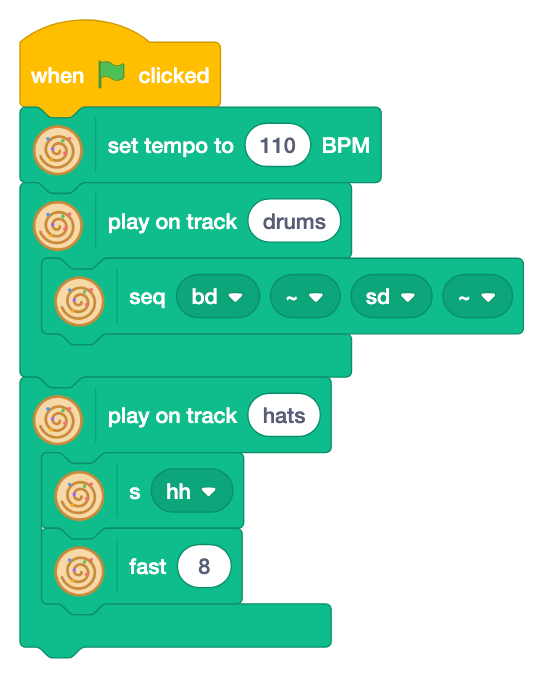
- "play on track [ ]" is shaped like a C. The blocks in it make the sound of one track.
- The blocks in it read from top to bottom. The top block makes the sound (
s,note,seqand others), and the blocks under it change it (fast, effects and others), in the same order ass("hh").fast(8)in Strudel. - Round blocks are values, which go where a number or text goes.
Three levels of blocks
Only a few blocks are shown at first. Show more blocks as you get used to them.

Choose "normal" or "master" with ▼ of the top block of "Strudel" and click the block. When you open a project, the level changes to the one the project uses.
| Level | What you can do | Steps |
|---|---|---|
| Beginner | Choose sounds with ▼, put them in order and layer them. Move sprites with the music | 1〜7 |
| Normal | Write songs with mini-notation, lists, rhythms, effects, scales and your own voice | 8〜11 |
| Master | Tricks of club music: acid, trance gate, pumping and more. Techniques which make four on the floor cool | 12〜14 |
The blocks are in English, Japanese and Japanese (Hiragana). The editor shows them in its language.