
0Get ready: add the extension
The project of each step already has the extension, so you do not need this when you start from a step.
To make your own project from scratch, this button is the easiest. It opens a new project with the extension.
To add the extension to a project you are working on, load it like this.
- Open the Xcratch editor.
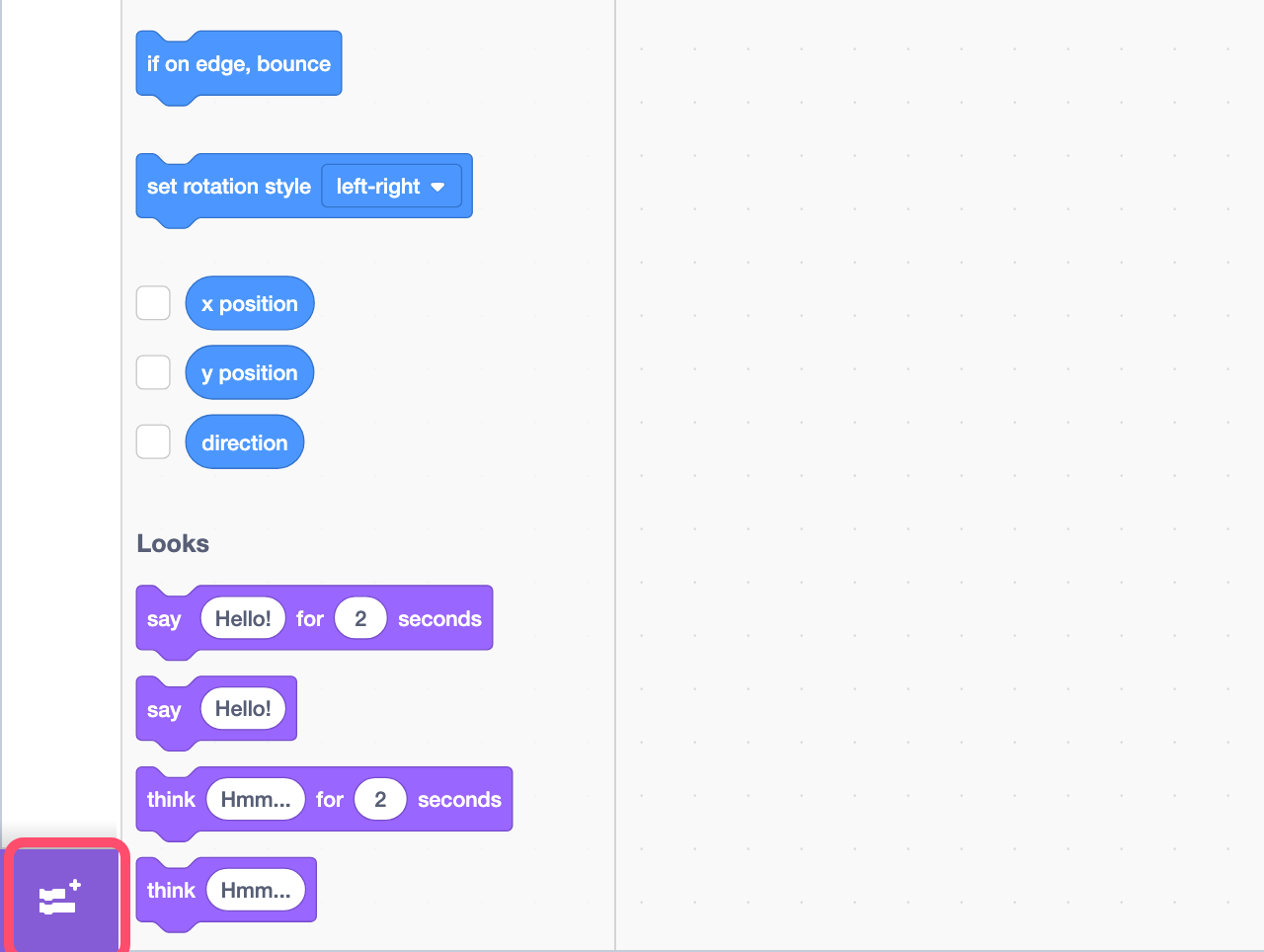
- Click the "Add Extension" button at the bottom left.
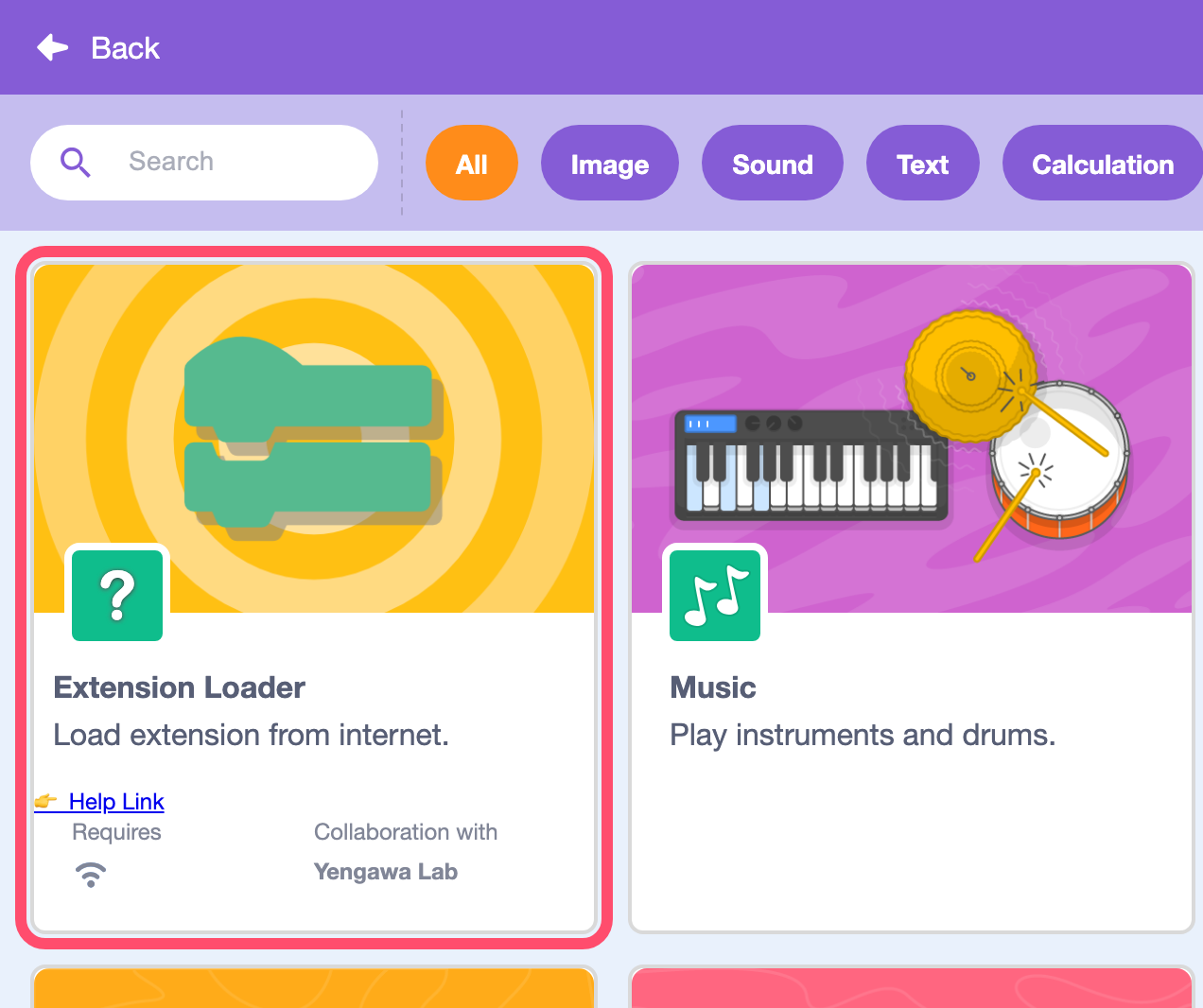
- Choose "Extension Loader", the first card.
- Enter this URL and click "OK".
https://0x48lab.github.io/xcx-strudel/dist/strudel.mjs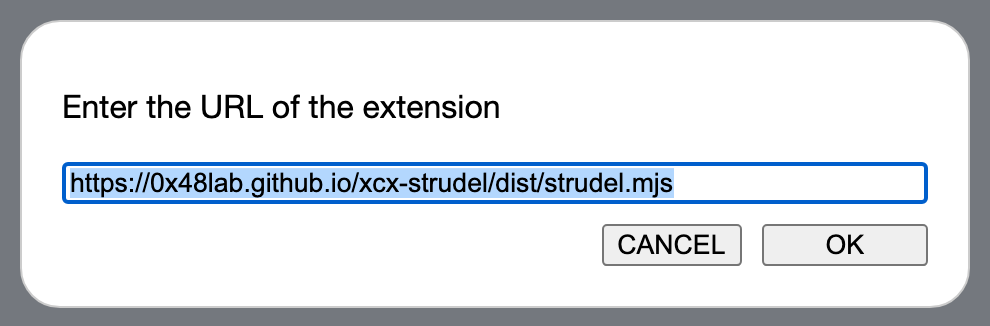
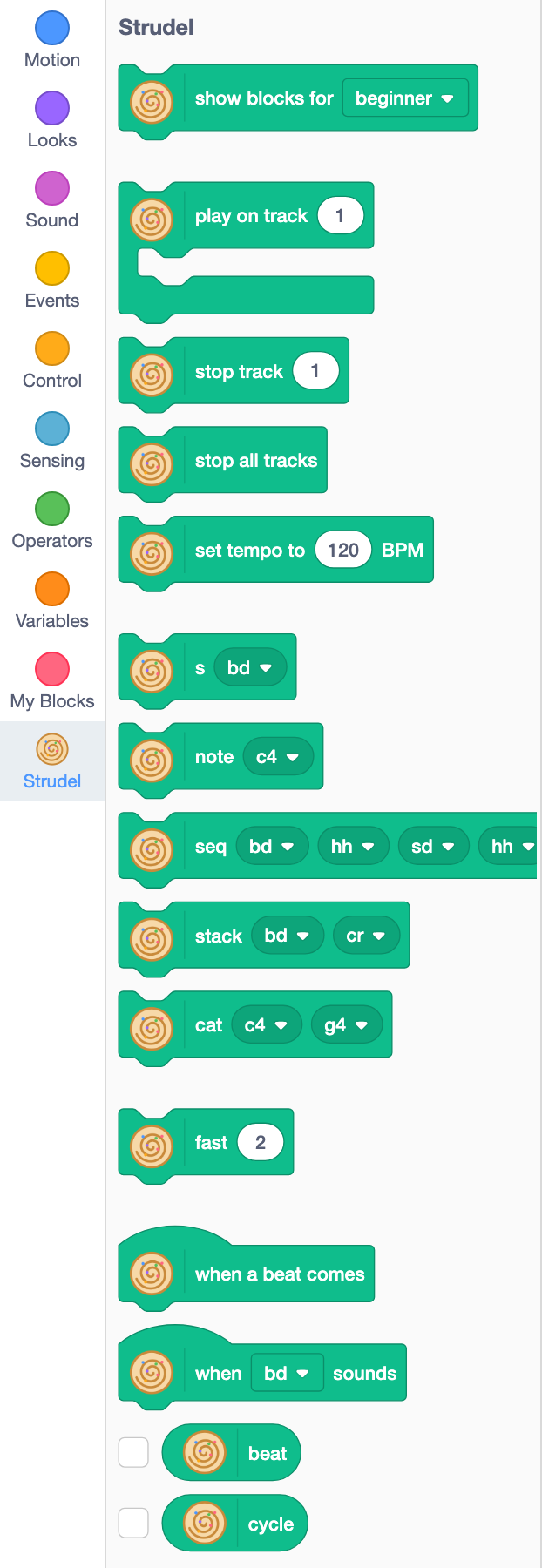
When "Strudel" appears on the left, you are ready. The green blocks with the swirl are the blocks of this extension.
At first only the "beginner" blocks are shown. Choose "normal" or "master" in the top block to show more blocks.
If you hear nothing, click the green flag again. Browsers do not play sound until you touch the page.
1Play a sound
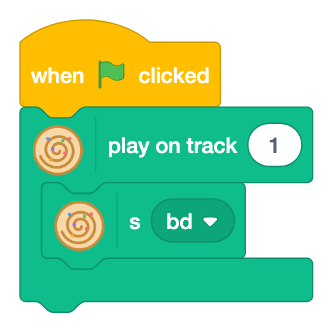
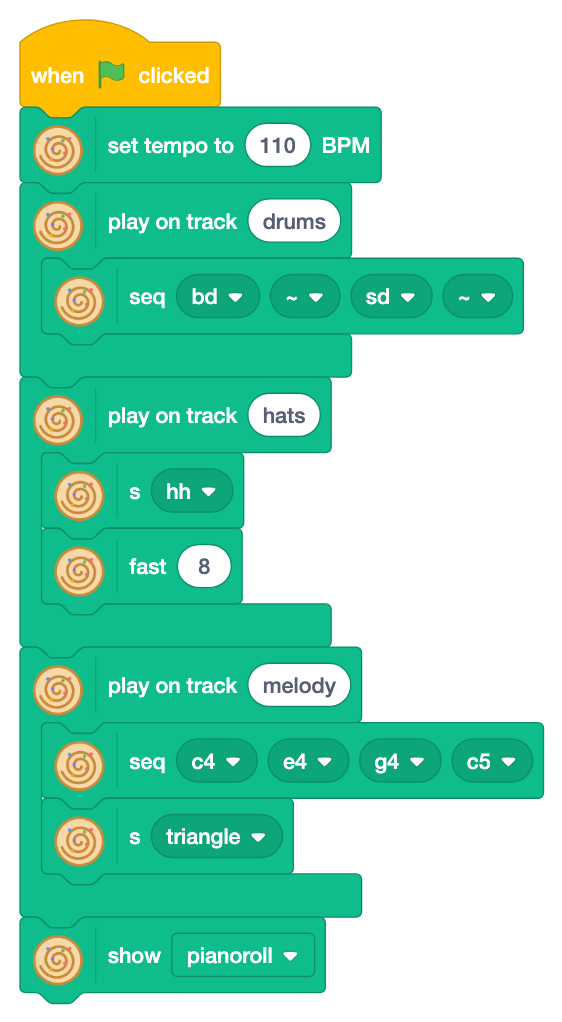
"play on track [ ]" is the most important block. It is shaped like a "C" with an open mouth, and the blocks in it make the sound of one track. Here the "s" block (sound: chooses the kind of sound) is in it. Click the green flag, and bd (bass drum) plays "boom, boom..." again and again. Click the red button to stop.
Click ▼ of "s" to choose another sound. The names in the menu are the same as in Strudel: drums such as sd (snare drum), hh (hi-hat), oh (open hi-hat), cp (clap) and cr (crash cymbal), synthesizer sounds (sine, square, sawtooth, triangle, supersaw), and ~ (rest: no sound).
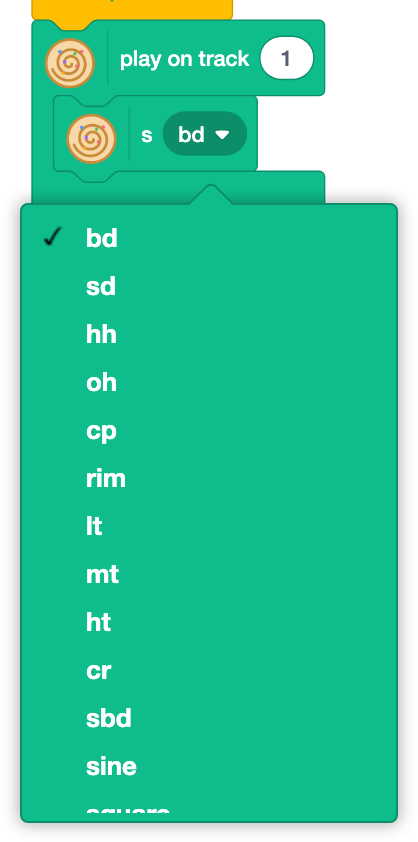
- Change it to
sdorcp. You can change it while it plays. - Take "s" out of the track and put the "note" block (pitch) in instead.
c4is C andd4is D.
2Sounds in order
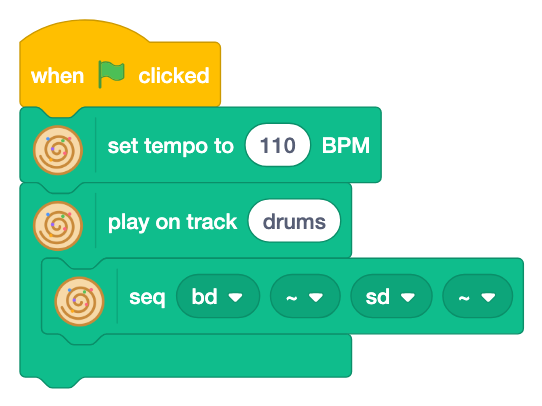
Put the "seq" block (sequence: sounds in order) in the track, and four sounds play one after another: "boom, -, tap, -". That is a beat. ▼ of "seq" has drums, notes and ~ (rest).
What is a cycle?
In Strudel a loop is called a "cycle". In this extension, a cycle = 4 beats = a bar. The time in which the drums count "1, 2, 3, 4" is one cycle, and it repeats again and again.
bd~sd~The sounds of "seq" fit exactly into one cycle: four sounds get a beat each, eight sounds half a beat each. More sounds do not make the cycle longer; they only make the steps finer.
The tempo sets how long a cycle is. BPM in "set tempo to [ ] BPM" means beats in a minute, so at 120 BPM a beat is 0.5 seconds and a cycle (4 beats) is 2 seconds.
When the next steps say "8 times in a cycle" or "a bar at a time", remember this picture. With "set beats in a cycle to [ ]" (Normal) set to 3, a cycle has 3 beats (a bar in three).
You can name the track (here "drums") as you like.
- Change a
~tohh. What happens? - Set the tempo to 80 or 140.
3Layer tracks
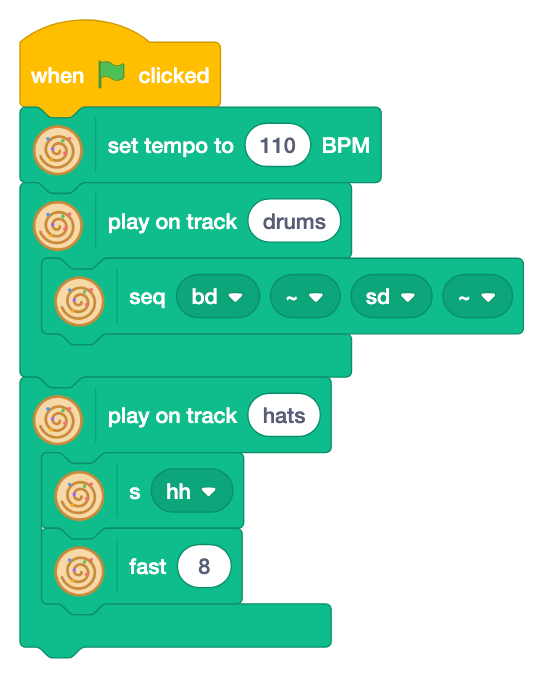
Add another track block with another track name, and the two play together, like instruments joining a band.
"fast [ ]" (play faster) plays the same sound many times in a cycle. Stack it under "s hh", and eight hi-hats make the beat groove.
The blocks in a track read from top to bottom. First choose a sound (here hh), then stack under it how to change it (here fast 8).
Playing again on the same track name replaces the old pattern. You will use this in step 5.
- Change 8 to 16 or 3.
- Put "stack" (play together, stacked on top of each other) in place of "s hh" to play
bdandcrat the same time.
4Make a melody
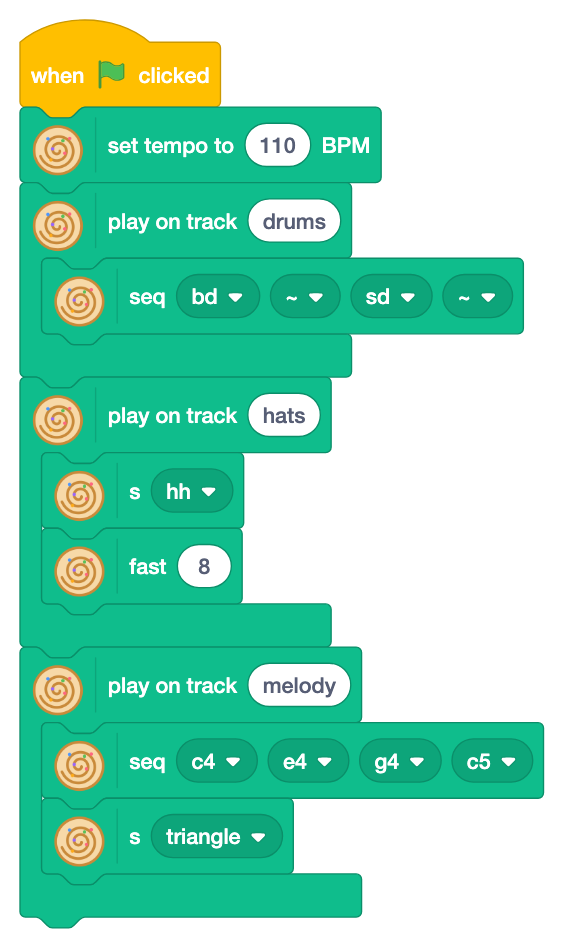
A third track "melody" is added. Read it from the top.
- "seq c4 e4 g4 c5" makes a phrase: C, E, G, high C.
- "s" under it chooses the kind of sound:
triangle,sawtooth,square,sineand more. These are the shapes of the waves.
In step 1, "s" was the sound itself. Under notes, it chooses which sound plays the notes.
- Change
triangletosawtoothorsquare. - Change the notes and make your own melody.
- Put "cat" (concatenate: one in each cycle) in place of "seq". With
c4andg4it plays C, G, C, G..., a note in each cycle.
5Change the song with keys
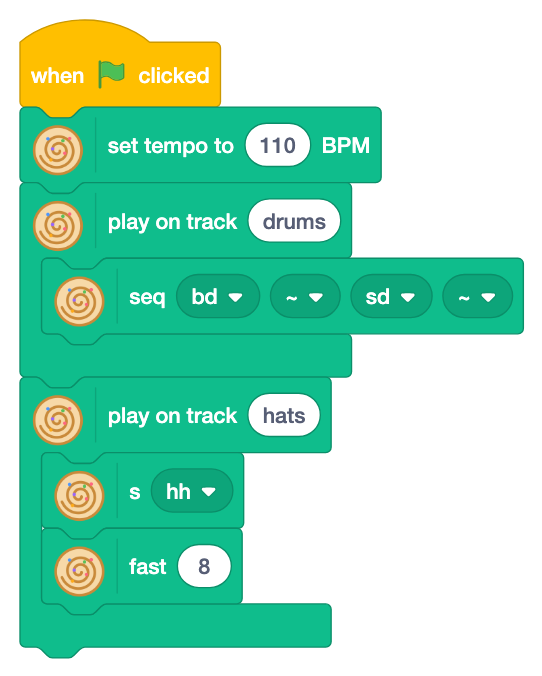
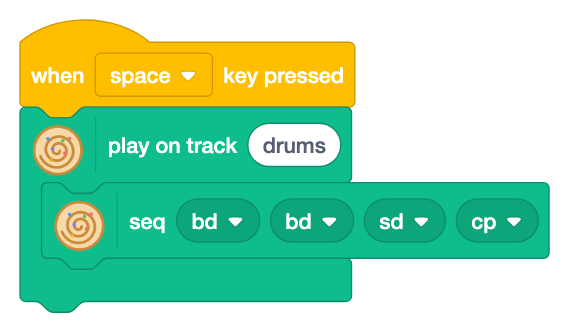
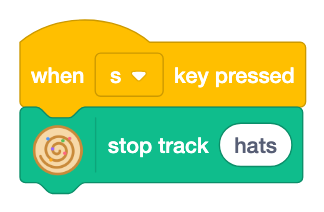
Changing the music while it plays is the most fun part of Strudel. It is called live coding.
- Space: plays another rhythm on the "drums" track. The track name is the same, so it replaces the old rhythm.
- s: "stop track [ ]" stops only the hats.
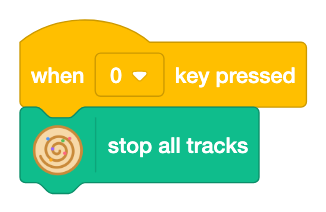
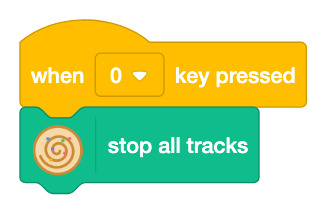
- 0: "stop all tracks".
The change happens at the start of the next cycle, so the rhythm never slips, whenever you press a key.
Click the stage once before you use keys.
- Add keys so that you can switch between three rhythms.
6See the sound
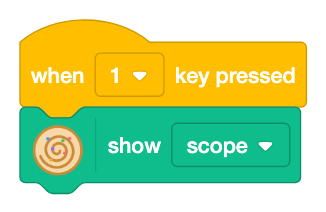
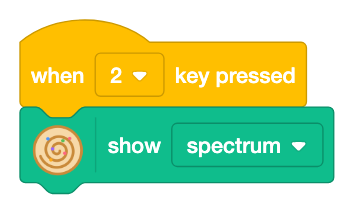
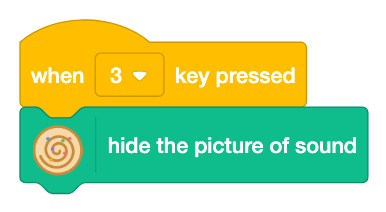
"show [ ]" draws the sound on the stage.
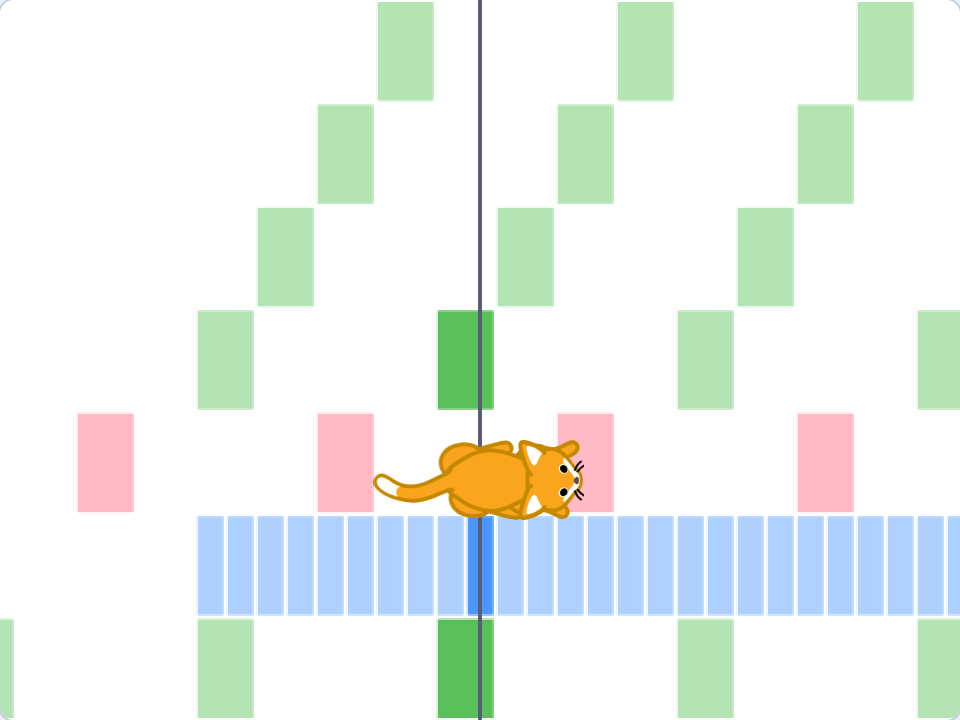
pianoroll (piano roll): which note plays when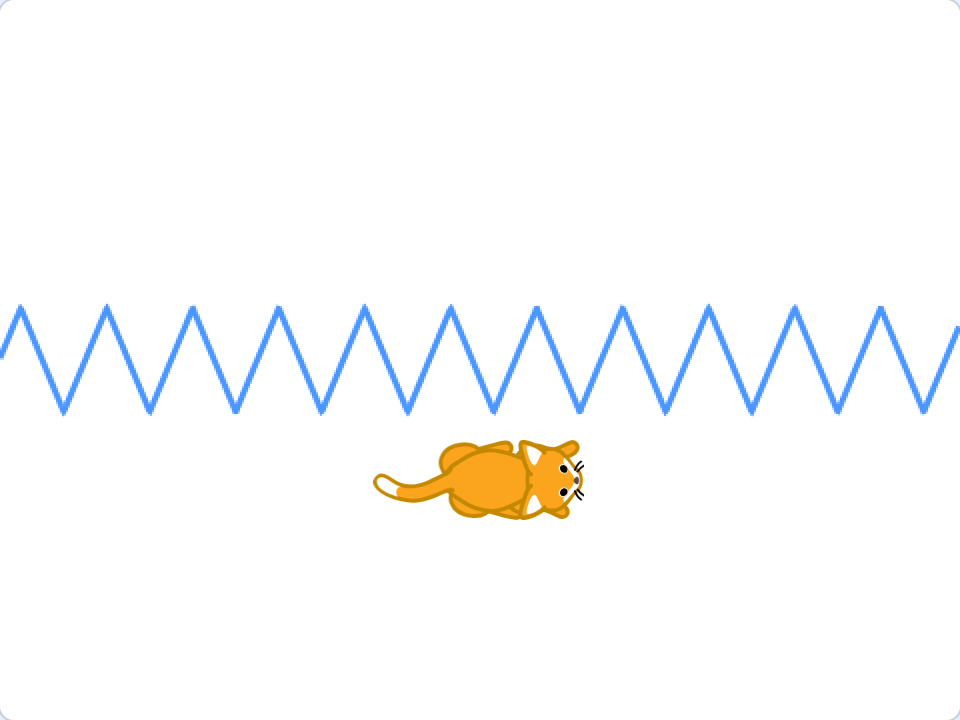
scope (oscilloscope): the shape of the wave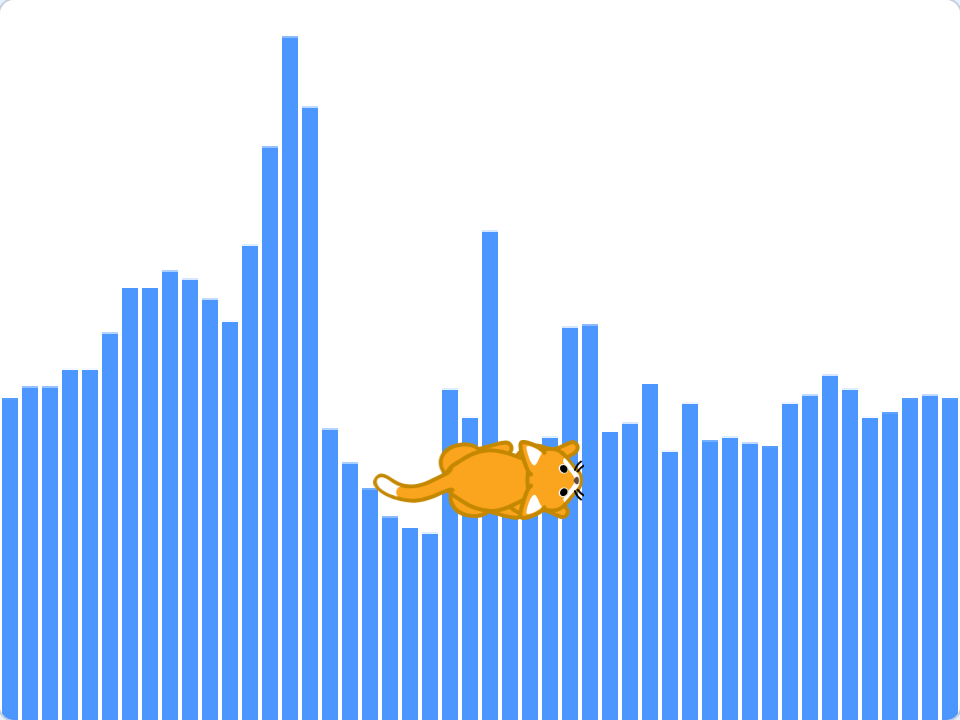
spectrum: how loud low to high sounds areIn pianoroll, the vertical line in the middle is "now". Higher notes are drawn higher. The picture is drawn behind the sprites, so you can still see the cat.
7Make the cat dance
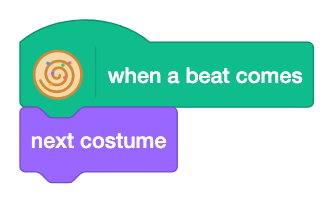
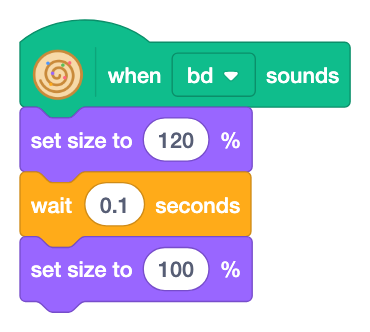
These blocks move sprites with the music.
- "when a beat comes": runs on every beat. With "next costume" the cat steps to the beat.
- "when [ ] sounds": runs each time the chosen drum plays. Jump on
bd, change the color onsd...
They work with all the usual Scratch blocks.
- When
sdsounds, "change color effect by 25". - Use the "beat" and "cycle" values to move the cat.
8Normal level: mini-notation, effects and scales
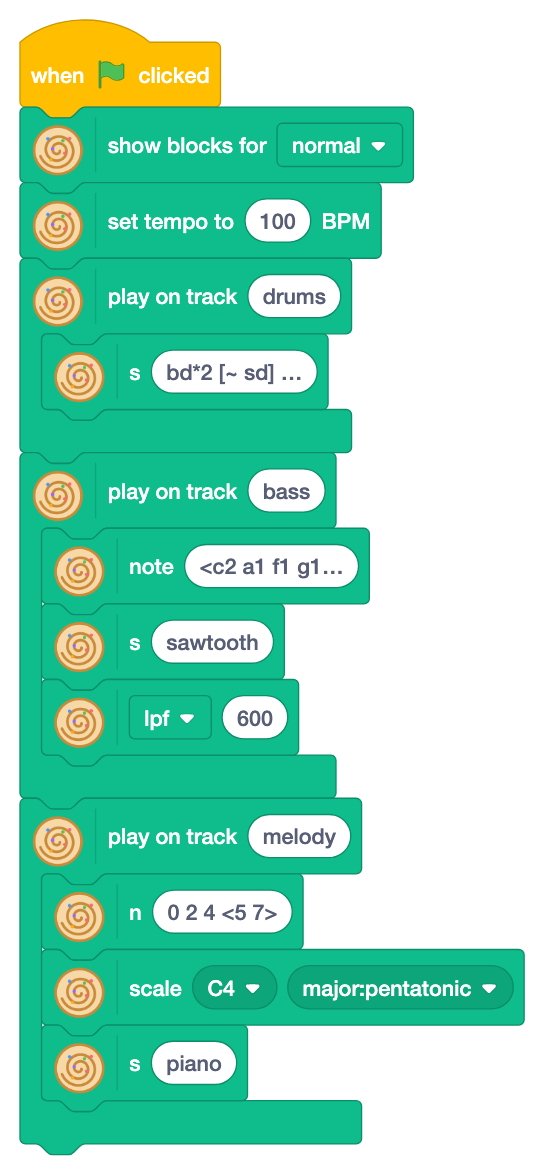
Choose "normal" in the top block to show more blocks. "s [bd ▼]" and "note [c4 ▼]" with ▼ are replaced by "s [ ]" and "note [ ]", where you write text.
Mini-notation
In "s [ ]" (sound) you write sounds just like Strudel, and in "note [ ]" you write notes the same way. The drums here are bd*2 [~ sd] <hh oh> sd and the bass is <c2 a1 f1 g1>*2 (long texts are cut with "…" in the block).
| Write | Meaning | Example |
|---|---|---|
bd sd | sounds separated by spaces play in order | bd hh sd hh |
~ | rest | bd ~ sd ~ |
*2 | play it twice | hh*8 |
[ ] | fit into the time of one | bd [sd sd] |
< > | one in each cycle, taking turns | <bd cp> |
, | play at the same time | bd*4, hh*8 |
Effects and scales
- The effect block "[lpf ▼] [600]": choose an effect with ▼ and write its value next to it.
lpf(low-pass filter: cuts high sounds so it sounds muffled),room(reverb: an echo like in a big room),delay(repeats the sound later, like an echo in the mountains) and more.lpf 600under "s sawtooth" makes the bass sound soft. - "n [ ]" and "scale [ ] [ ]": write notes as step numbers of a scale in "n", and choose the scale with "scale" under it. On
major:pentatonic(the major pentatonic scale), any number sounds nice. The "piano" sound loads real piano sounds automatically.
9Write a song with lists and rhythms
Long chord progressions and melodies are hard to read in one line of mini-notation. Write them in Scratch lists, a bar in each item, and join them with a block. The rest of the tutorial writes songs with lists.
1. Make a list
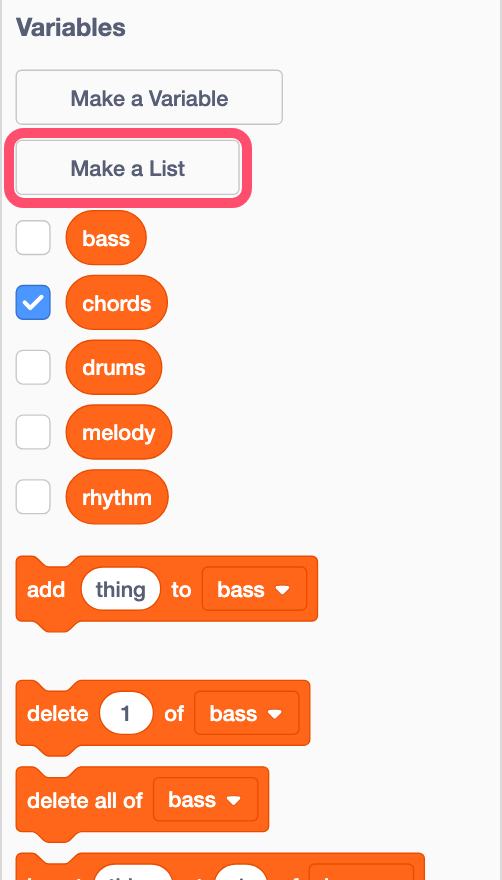
Click "Make a List" in "Variables" and give it a name. This project already has five lists: "chords", "bass", "melody", "rhythm" and "drums".
Check the box next to a list to show it on the stage. Click an item to change it, and "+" to add one.
Write one bar of mini-notation in each item. A chord is written like [f3,a3,c4]: the notes to play together, separated by , and put in [ ].
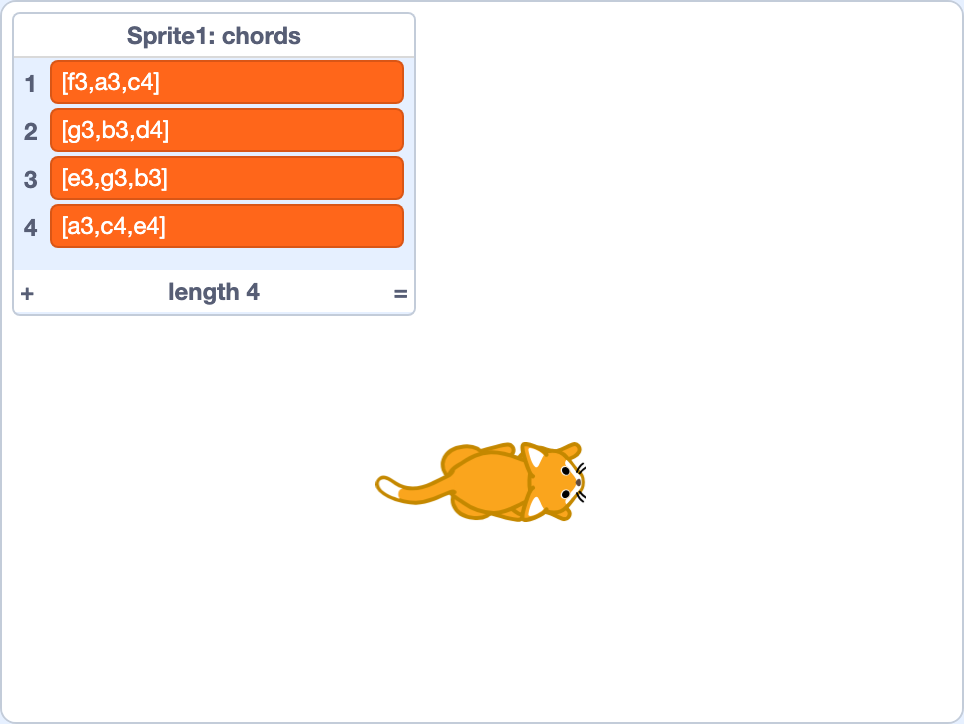
These chords, F, G, Em and Am, are a progression which is used very often in pop music.
2. Play a list
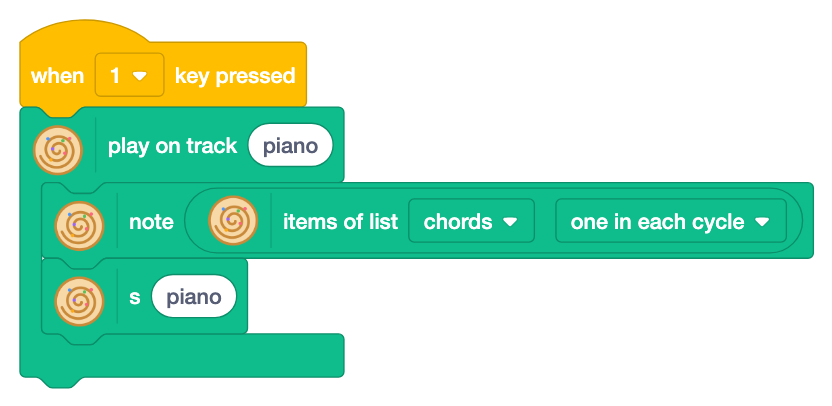
Put "items of list [ ] [ ]" into the text of "note". The items are joined into one mini-notation.
| Choose with ▼ | Mini-notation | Use |
|---|---|---|
| one in each cycle | <[item1] [item2] …> | an item = a bar: lists "chords", "bass", "melody" |
| in order in a cycle | [item1] [item2] … | an item = a beat: list "rhythm" |
| all together | [item1], [item2], … | an item = a drum: list "drums" |
Press 1 and the chords ring, a bar each. Before pressing keys, click the stage outside the list (keys typed after clicking in the list change the list).
3. Play on a rhythm
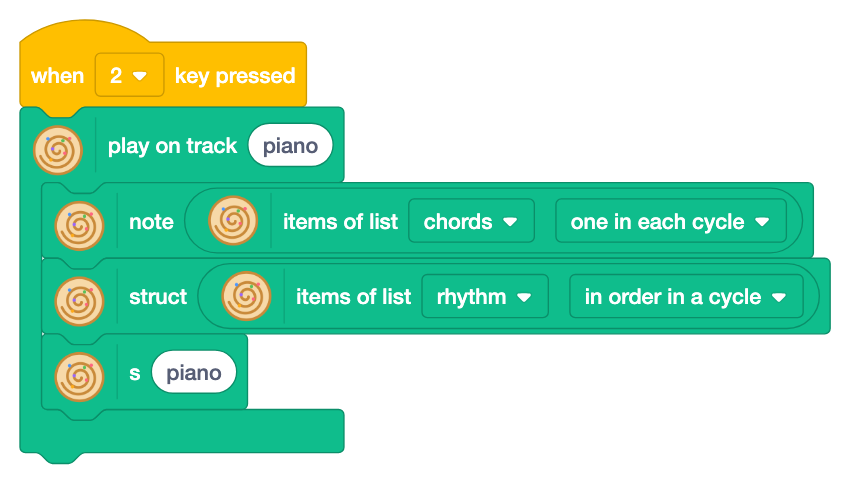
"struct [ ]" (structure: play in a rhythm) under "note" plays only on x; ~ is a rest. The chords stay the same and get a rhythm.
The rhythm is in a list too. The items of "rhythm" are x ~, ~ x, x x and ~ x. "in order in a cycle" makes each item a beat, each beat cut in two. Key 2 replaces the piano and it starts to bounce.
| Beat | 1 | 2 | 3 | 4 |
|---|---|---|---|---|
| list "rhythm" | x ~ | ~ x | x x | ~ x |
Try it: make all four items x for quarter notes, or ~ x for off-beats. The chords are the same, but the feel changes a lot.
In Strudel
note("<[[f3,a3,c4]] [[g3,b3,d4]] [[e3,g3,b3]] [[a3,c4,e4]]>")
  .struct("[x ~] [~ x] [x x] [~ x]").s("piano")
s("[bd [~ bd] ~ ~], [~ ~ sd ~], [hh*8]")
4. Add bass, melody and drums
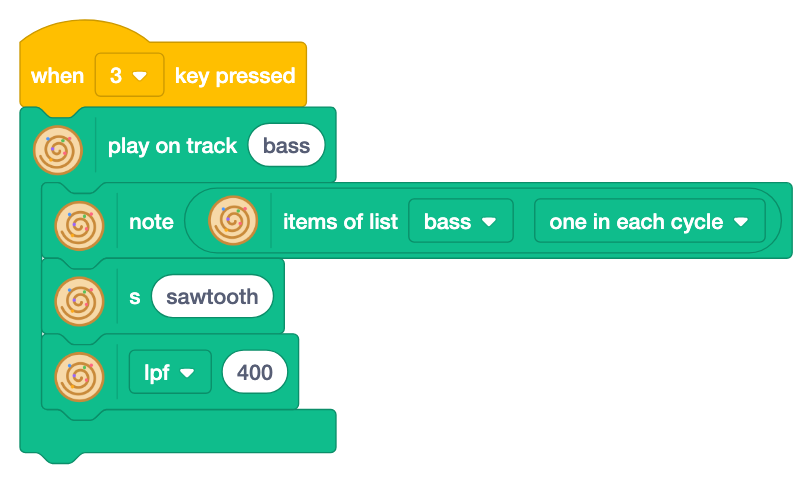
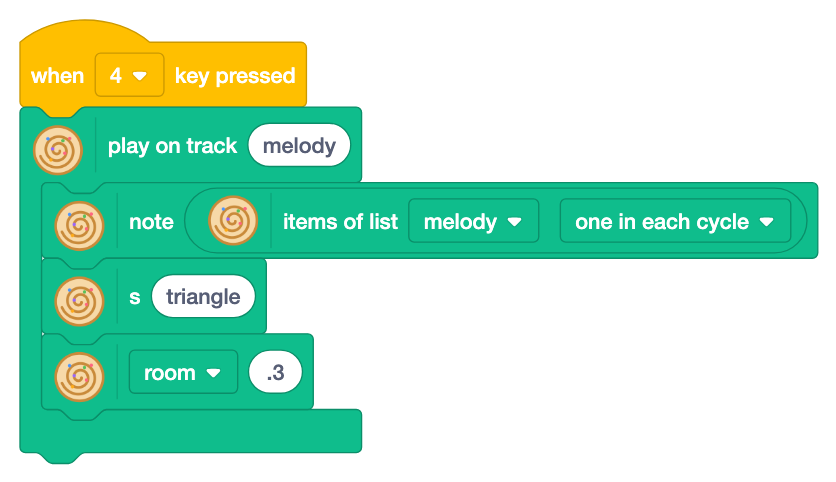
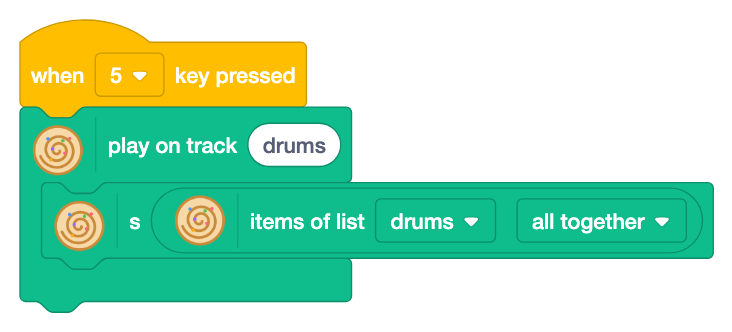
Bass and melody are in lists too, a bar in each item. Add them with keys 3, 4 and 5. Key 0 stops everything.
The drums are "all together": in the list "drums", each item is a line for one drum, like the screen of a drum machine.
| Drum | Item of "drums" |
|---|---|
bd | bd [~ bd] ~ ~ |
sd | ~ ~ sd ~ |
hh | hh*8 |
| Bar | chords | bass | melody |
|---|---|---|---|
| 1 | [f3,a3,c4] | f2 [~ f2] f2 [~ f2] | [c5 d5] [e5 ~] [d5 c5] [a4 ~] |
| 2 | [g3,b3,d4] | g2 [~ g2] g2 [~ g2] | [b4 c5] [d5 ~] [g4 ~] ~ |
| 3 | [e3,g3,b3] | e2 [~ e2] e2 [~ e2] | [e5 d5] [b4 ~] [g4 b4] [d5 ~] |
| 4 | [a3,c4,e4] | a2 [~ a2] a2 [~ a2] | [c5 ~] [b4 a4] a4 ~ |
Read across: the notes of the same bar are in one row. A melody sounds nice when it uses the notes of the chord of its bar.
- Swap the second and third items of "chords".
- Add
~ cp ~ cpto "drums" for claps. - Add four items to "melody" for an eight-bar melody (chords and bass repeat every four bars).
10Make a beat with your voice
A voice you record in Scratch, or a sound which comes with Scratch, can be an instrument of Strudel. A beat made of your own voice is a lot of fun.
1. Record your voice
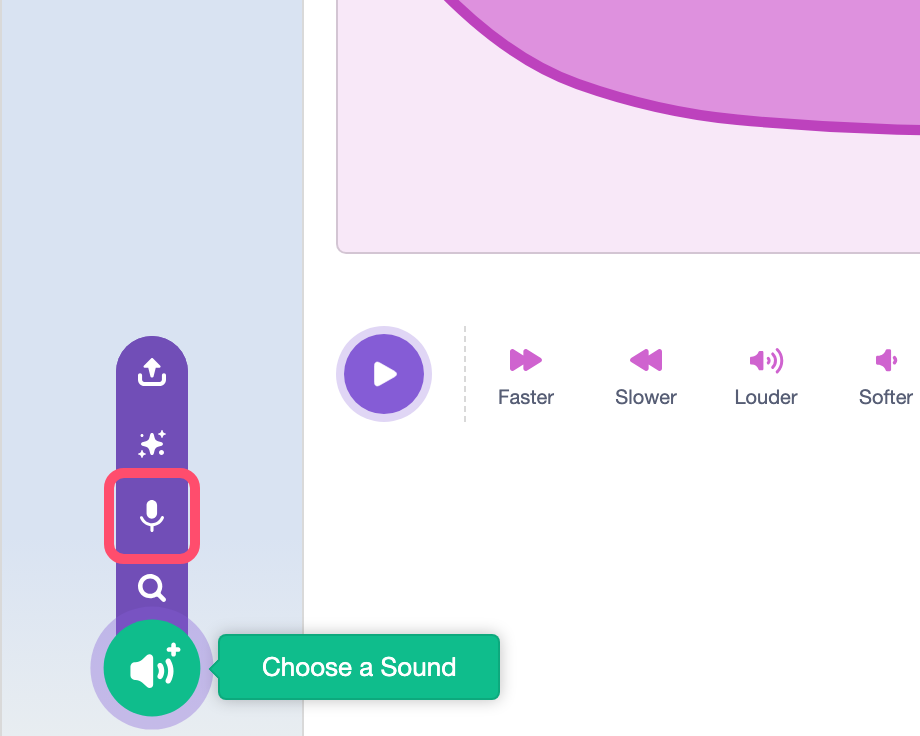
- Open the "Sounds" tab at the top.
- Hover on "Choose a Sound" at the bottom left, and click the microphone (Record).
- If the browser asks to use the microphone, click "Allow".
- Click the red "Record" button and speak. Stop, listen with "Play", and click "Save".
Short sounds like "boom", "pah" and "tss" work best. The recording is added to the list of sounds with a name like "recording1". This project has the cat's "Meow" at first.
2. Play the voice
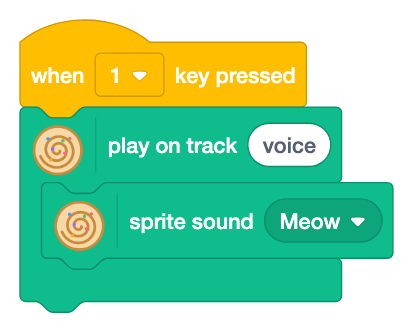
Put "sprite sound [ ]" in the track and choose a sound with ▼. Your recordings appear there. Like "s", it is a sound block which goes at the top of a track.
3. Repeat and shorten
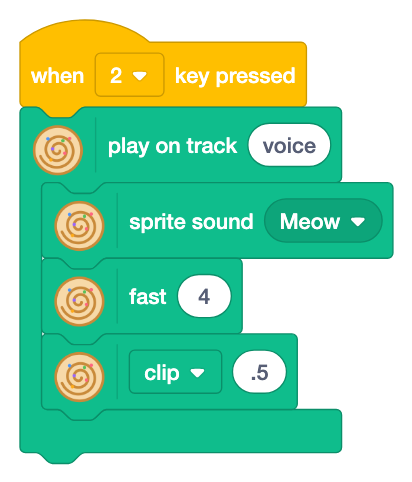
"fast 4" plays it four times in a cycle. If the voice is long and overlaps, cut it with the "clip" effect (cuts each sound short).
4. Change the pitch
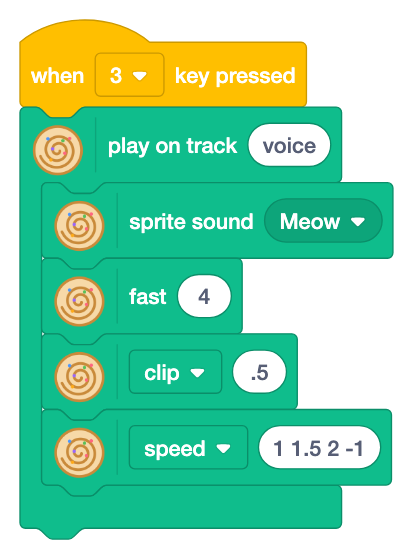
The "speed" effect (how fast the sound plays) changes the pitch. 1 1.5 2 -1 gives the four voices these pitches in turn.
| speed | What happens? |
|---|---|
1 | the voice as it is |
2 | an octave higher, and faster |
0.5 | an octave lower, and slower |
-1 | backwards |
5. Add reverb
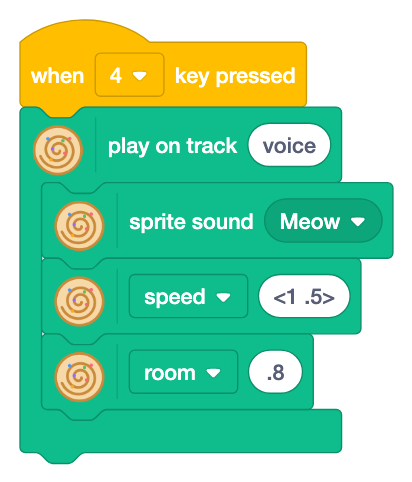
Key 4 changes the pitch every bar and adds reverb with room. Key 0 stops everything.
- Record your voice and choose it in every "sprite sound".
- Record "boom" and "pah" and play them on two tracks. Try "fast 2" and the "speed" effect on the "pah" track.
- At the master level, "chop [ ]" (cut each sound into small pieces) chops a long voice into small pieces.
Recordings live only in the browser, so they do not play in strudel.cc. When you save the project, the recordings are saved with it.
11Chords of jazz and soul
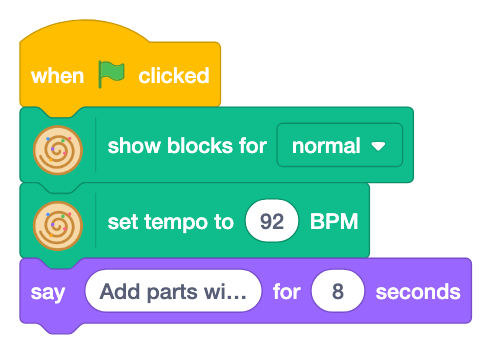
An original song with chords of jazz and soul, which you hear in stylish pop (the same song as the sample "Soul piano pop"). Chords, bass and melody are in lists, a bar in each item.
The secret of the chords
The progression is | FM7 | Em7 A7 | Dm7 G7 | Cmaj9 C9 | FM7 | Fm6 | Em7 E♭dim7 | Dm7 G7sus4 |. Compare it with the simple progression of step 9 (F, G, Em, Am).
| Bar | Trick | Listen for |
|---|---|---|
| all | sevenths and ninths (M7, m7, 9) | one or two notes added to plain triads make them stylish |
| 2 | Em7 → A7 | A7 has C♯, which is not a white key of C major, so it sounds a little sad |
| 3 | Dm7 → G7 (two-five) | the basic move of jazz; it wants to go home to the next chord |
| 6 | Fm6 | the bright F turns into a dark Fm: bittersweet |
| 7 | Em7 → E♭dim7 → Dm7 | the bass walks down by half steps: E, E♭, D |
The piano leaves out the roots. The bass plays them, so the piano plays only the notes which give the color.
The shuffle
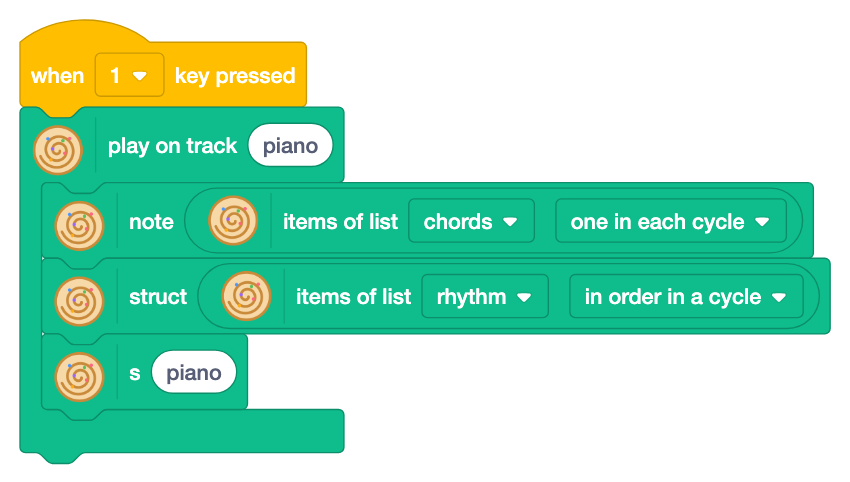
This song cuts a beat into three, so it bounces: a shuffle. As in step 9, the rhythm and the drums are lists.
| List | How | Items |
|---|---|---|
| rhythm | in order in a cycle (an item = a beat) | x ~ ~ ~ ~ x x ~ x ~ ~ ~ |
| drums | all together (an item = a drum) | [bd ~ ~] [~ ~ bd] [~ ~ bd] [~ ~ ~][~ ~ ~] [sd ~ ~] [~ ~ ~] [sd ~ ~][hh ~ hh]*4 |
The bass and melody lists also cut a beat into three.
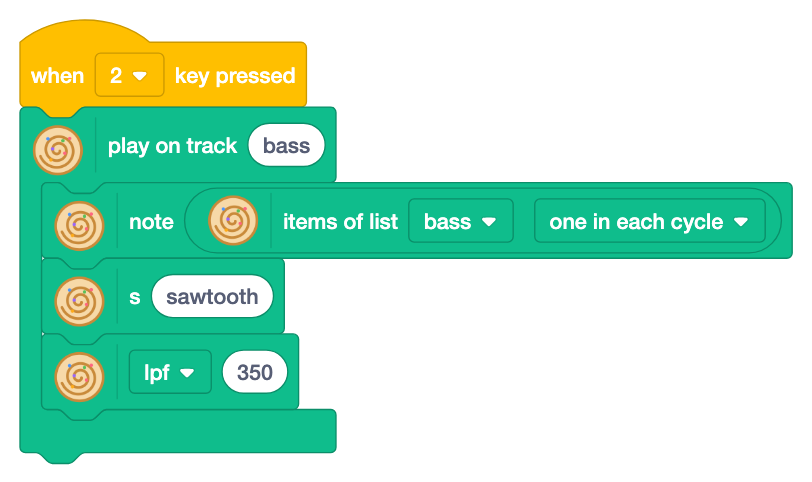
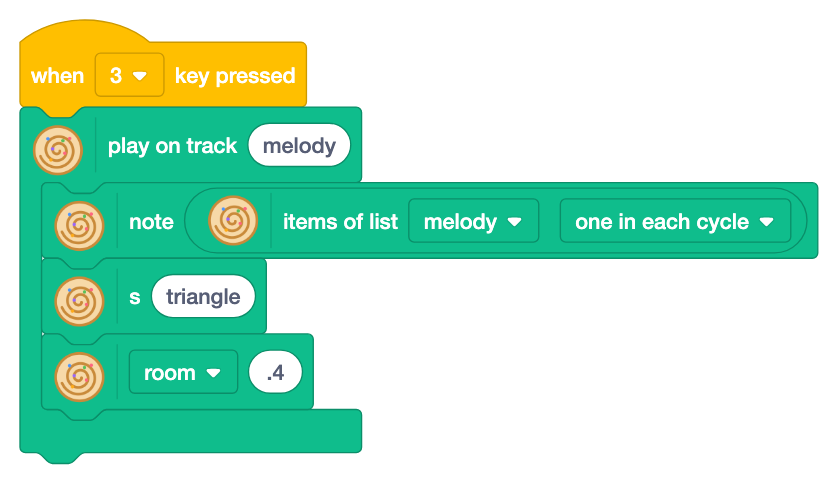
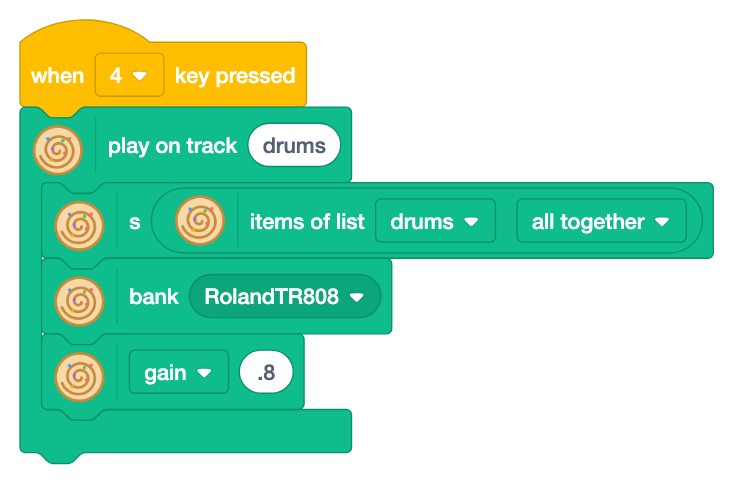
- Change the sixth chord
[f3,ab3,c4,d4](Fm6) to[f3,a3,c4,e4](FM7) and compare. The bittersweet feeling is gone. - Change the list "rhythm" to
x ~~ xx x~ xlike step 9, and it stops bouncing.
12Master level: acid and trance gate
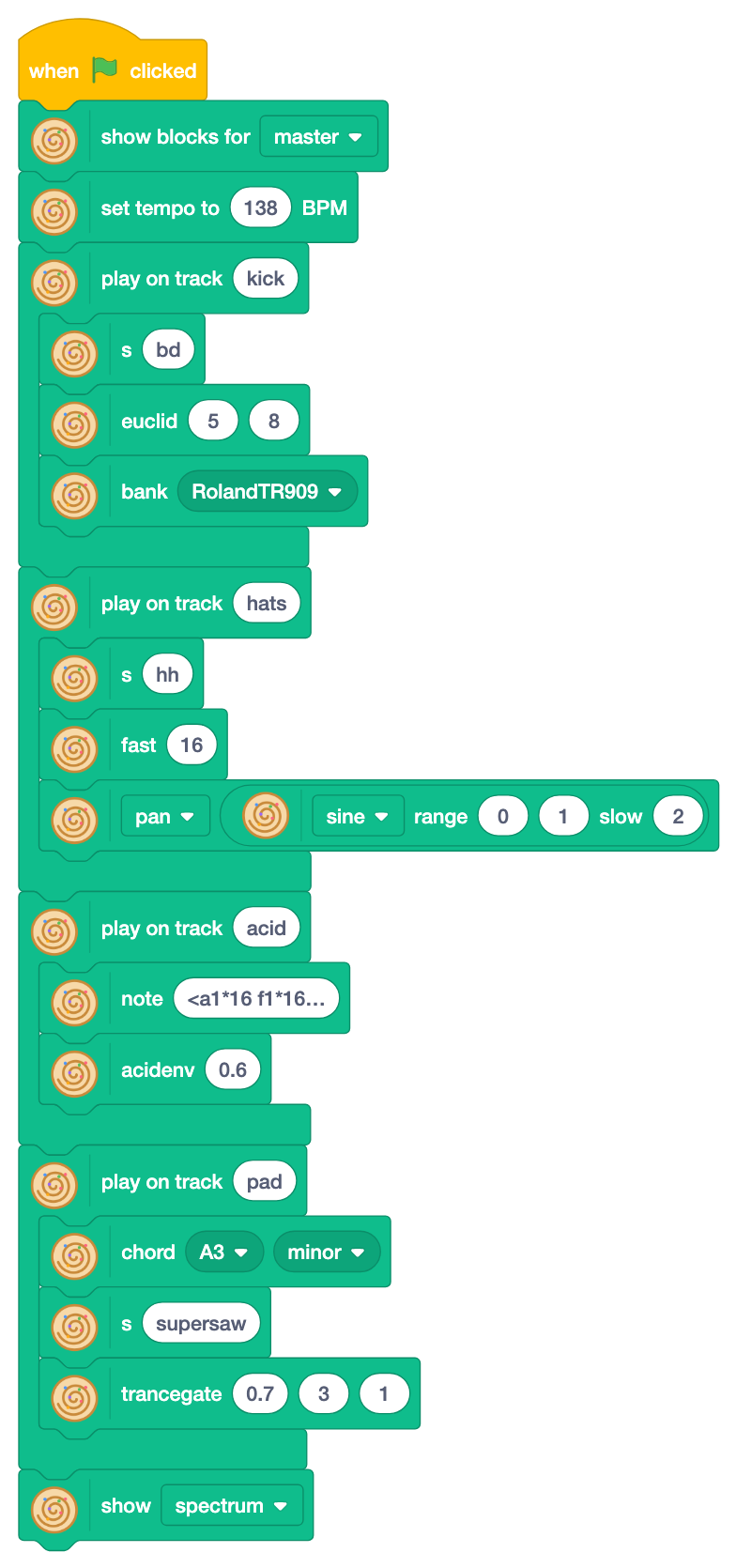
Choose "master" to use the tricks of club music.
- "euclid [ ] [ ]" (Euclidean rhythm):
euclid 5 8under "s bd" spreads 5 hits over 8 steps as evenly as possible. These rhythms are found in music all over the world. - "bank [ ]" (drum machine): the sounds of famous drum machines such as the TR-909 (
RolandTR909). - The wave block "[ ] range [ ] [ ] slow [ ]": put it where a number goes, and the value moves like a wave between the two numbers.
sine,saw,square,tri(triangle),rand(random) andperlin(smooth random) are the shapes of the wave, and "slow" sets how many cycles one wave takes. Here it is the value of thepaneffect (left and right), so the hi-hats move left and right. Round blocks are values like this. - "acidenv [ ]" (acid envelope): the squelchy bass of the TB-303. Its name comes from the
acidenvfunction in Switch Angel's strudel-scripts. - "chord [ ] [ ]": plays a chord from a root and a kind of chord, such as
A3minor. - "trancegate" (trance gate): chops long chords into short pieces. The numbers are density (how many pieces sound), seed (which random rhythm) and length. Change the seed to change the chopping. Its name comes from Switch Angel's
trancegatefunction.
- Change
euclid 5 8to 3 or 7 hits. - Change the seed of trancegate from 0 to 20 to find one you like.
ColumnTurn blocks into Strudel code
Everything you build with these blocks can become real Strudel code. The advanced lesson shows the code next to the blocks as "In Strudel", so learn how to read it first.
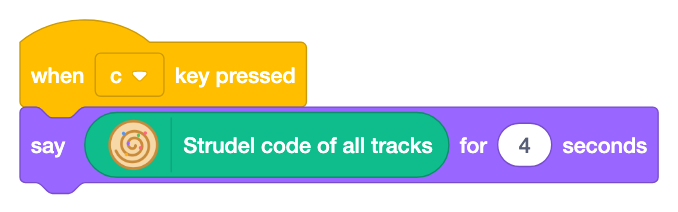
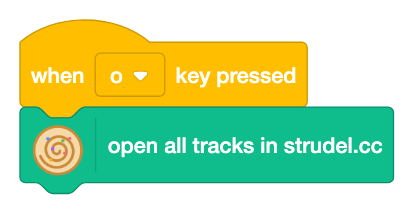
- "Strudel code of all tracks": the tracks you played, as code (kept after stopping). Click the block to see it.
- "open all tracks in strudel.cc": strudel.cc opens and plays the same song as code.
In the project of step 12, click the green flag and press c and o.
Blocks and code
| Block | Strudel code |
|---|---|
| play on track [ ] (the C block) | $: … (a line for each track) |
| blocks stacked in a track | from top to bottom, joined with . from left to right |
| set tempo to [ ] BPM | setcpm(…) (cycles per minute) |
| seq [ ] [ ] [ ] [ ] (at the top) | seq("bd", "~", "sd", "~") |
| stack [ ] [ ] / cat [ ] [ ] | stack(…, …) / cat(…, …) |
| s [ ] / note [ ] (at the top) | s("bd sd") / note("c3 e3") |
| items of list [ ] one in each cycle | "<[item1] [item2] …>" |
| s [piano] (under note and others: chooses the sound) | .s("piano") |
| fast [ ] / slow [ ] | .fast(8) / .slow(2) |
| [lpf ▼] [ ] (effect block) | .lpf(600) .room(.5) and more |
| struct [ ] | .struct("x ~ x x") |
| bank [ ] | .bank("RolandTR909") |
The block names are the same as the names in Strudel code, so once you know a block, you can already read its code.
What is a function?
A function takes a pattern and gives back a changed pattern. In code, the name after . is the name of the function, and the values in () are what you give to it (arguments).
note("c3 e3 g3").transpose(12)   // give 12 to transpose → the pattern an octave higher
note("c3 e3 g3").lpf(600)        // give 600 to lpf → the pattern sounds muffled
Functions in a chain work from left to right, just like blocks stacked from top to bottom in a track.
Blocks read from the top
Read the blocks in a track from top to bottom, and they are already the code. The lead track of step 13 has n, scale, s supersaw, superimpose transpose 12, unison 7 and room .8 from the top. That is this Strudel code:
n(…).scale(…).s("supersaw").superimpose(x => x.transpose(12)).unison(7).room(.8)The top block (s, note, n, seq and others) makes the sound, and each block under it changes the sound in turn. An "s" or "note" under the top block changes the sound or the pitch, like .s(…).
Functions which take a function
The master level blocks sometimes, every, jux, off and superimpose take a function as an argument (they are called higher-order functions). Each item in ▼, such as rev or transpose 12, is a function. The block decides when and where, and ▼ decides what to do.
| Block | Strudel code | What it does |
|---|---|---|
| sometimes | .sometimes(x => x.transpose(12)) | applies the function sometimes (to about half of the sounds) |
| every | .every(4, x => x.rev()) | applies the function once in 4 cycles |
| jux | .jux(x => x.rev()) | splits left and right, and applies the function to the right only (juxtapose = put side by side) |
| off | .off(0.125, x => x.transpose(7)) | adds a copy with the function applied, a little later |
| superimpose | .superimpose(x => x.transpose(12)) | adds a copy with the function applied, on top |
Read x => x.transpose(12) as "take x, and give back x an octave higher". It is a function without a name, made on the spot.
Your own blocks made with "Make a Block" in Scratch are functions too. The names on the blocks (sometimes, transpose ...) are the same in code, so learn them by name for Strudel.
When and how to use each block, where its name comes from and a little history are in the block dictionary.
Using strudel.cc
- After changing the code, press Ctrl+Enter to play it again. Ctrl+. stops.
- Change one number at a time and listen each time.
- Add
.hush()at the end of a track to mute only that track. trancegateis not built into Strudel (it comes from Switch Angel's strudel-scripts), so the code usesstructand also has a function which does the rest (fillGaps). Sprite sounds do not play in strudel.cc.
13Advanced: sounds of EDM and trance
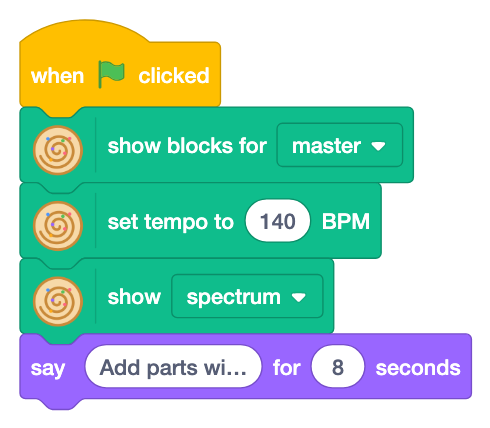
EDM and trance are made of several "parts". Press the keys one by one to add parts, and listen to what each one does. The tempo is 140 BPM.
| Key | Part | Key | Part |
|---|---|---|---|
| 1 | kick | 5 | lead |
| 2 | off-beat bass | 6 | build-up (snare + riser) |
| 3 | pad with a trance gate | Space | drop (stop the build-up) |
| 4 | arpeggio pluck | 7 | pumping (1 goes back) |
Key 0 stops everything. Each part starts at the beginning of the next cycle.
As in step 9, the music is in lists, a bar in each item.
| List | Items (a bar each) | Used by |
|---|---|---|
| chords | [a3,c4,e4,a4] [f3,a3,c4,f4] [c4,e4,g4,c5] [g3,b3,d4,g4] | pad and pluck (two parts share one list) |
| bass | [~ a1]*4 [~ f1]*4 [~ c2]*4 [~ g1]*4 | off-beat bass |
| lead | [7 ~ 9 11] [12 11 ~ 9] and more, 4 bars | lead (scale steps) |
| build-up | sd*4 sd*8 sd*16 sd*32 | snare |
Change the list "chords", and the pad and the pluck change together.
1. Kick: four on the floor
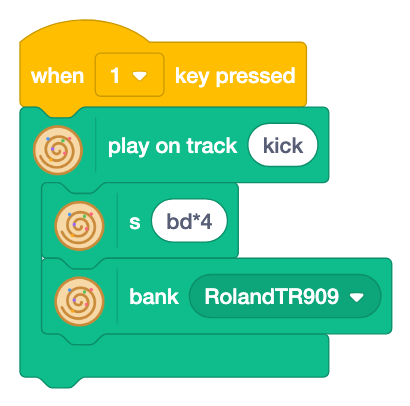
Four kicks a bar: "boom, boom, boom, boom". This is the heart of dance music. The TR-909 is a famous drum machine of house and techno.
In Strudel
s("bd*4").bank("RolandTR909")2. Off-beat bass
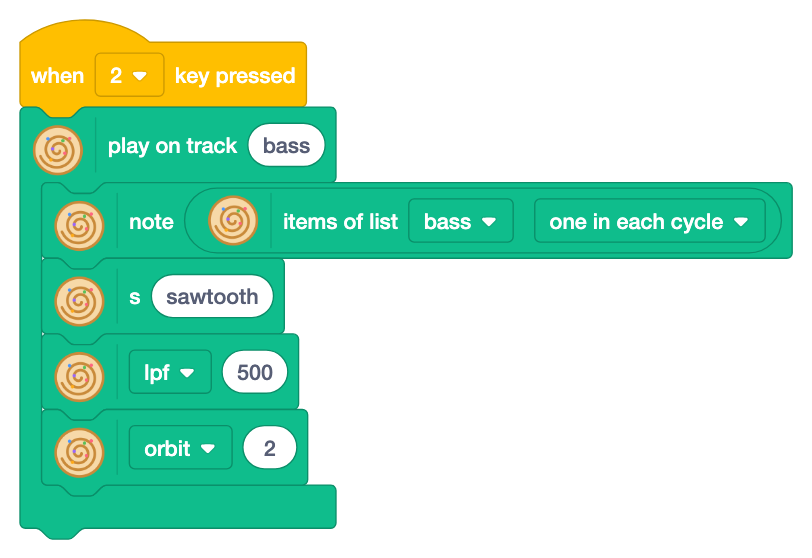
[~ a1]*4 in the list "bass" is "rest, A" four times. It plays only between the kicks (off-beats), so it bounces with the kick without bumping into it. lpf 500 cuts the high sounds and keeps the low end. (orbit 2 is for pumping in part 7.)
In Strudel
note("<[~ a1]*4 [~ f1]*4 [~ c2]*4 [~ g1]*4>").s("sawtooth").lpf(500).orbit(2)Try it: change [~ a1]*4 to [~ a1 a1 a1]*4 for the "rolling bass" of trance.
3. Pad with a trance gate
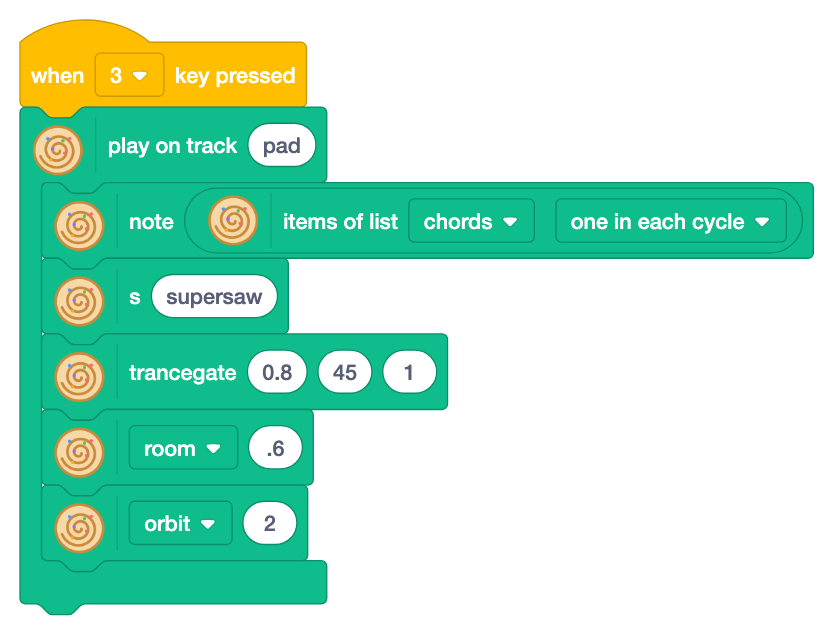
The chords of the list "chords" are held with supersaw (many sawtooth waves together) and chopped by trancegate. room makes it sound like a big hall.
In Strudel
note("<[a3,c4,e4,a4] [f3,a3,c4,f4] [c4,e4,g4,c5] [g3,b3,d4,g4]>").s("supersaw")
  .trancegate(.8, 45, 1).room(.6).orbit(2)
trancegate is not built into Strudel. When you open the code in strudel.cc, it becomes Strudel functions which do the same (struct and fillGaps).
4. Arpeggio pluck
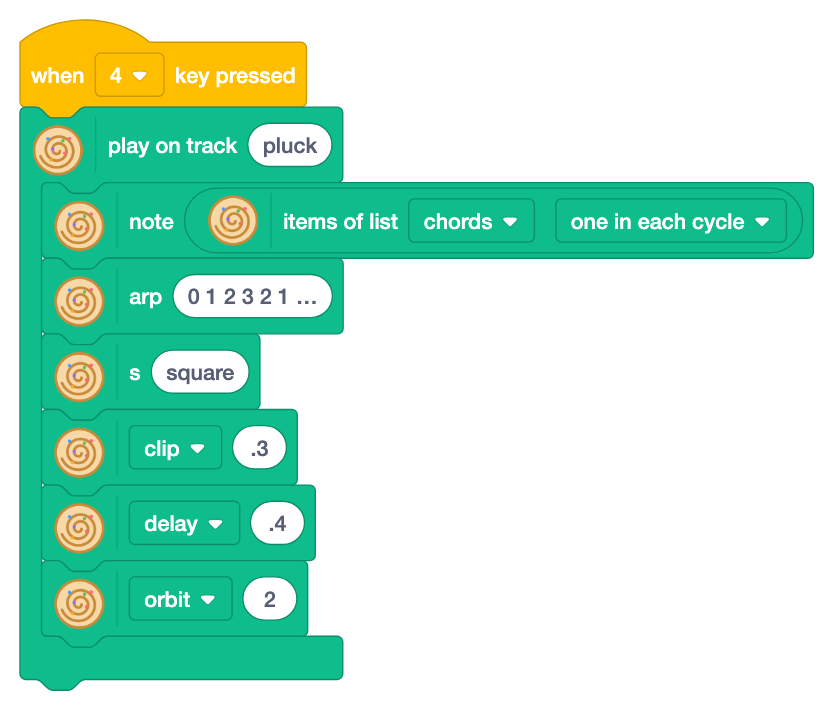
Playing the notes of a chord one by one is an arpeggio. The "arp [ ]" block (arpeggio) plays them in the order of the numbers. It uses the same list "chords" as the pad. clip .3 makes the notes short like a plucked string, and delay repeats them later so they sparkle.
In Strudel
note("<[a3,c4,e4,a4] [f3,a3,c4,f4] [c4,e4,g4,c5] [g3,b3,d4,g4]>")
  .arp("0 1 2 3 2 1 2 3").s("square").clip(.3).delay(.4).orbit(2)
5. Thick lead
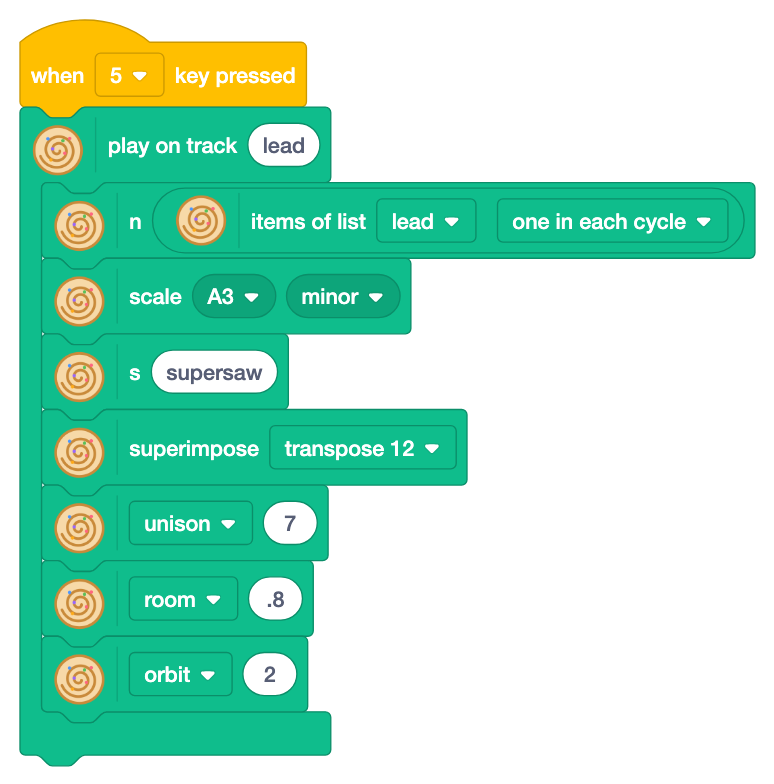
Three tricks make the melody stand out.
unison7 (how many waves sound together): seven sawtooth waves, each a little off in pitch. Like a choir, many voices sound thick.superimposetranspose 12: the same melody also plays an octave (12 semitones) higher, so it shines. superimpose puts what the function in ▼ makes (transpose 12) on top of the melody.room .8: a big room, so it spreads far.
The blocks from top to bottom are the code from left to right (see "Blocks read from the top" in the column).
In Strudel
n("<[7 ~ 9 11] [12 11 ~ 9] [11 ~ 9 7] [8 ~ 9 6]>*2").scale("A3:minor")
  .s("supersaw").superimpose(x => x.transpose(12)).unison(7).room(.8).orbit(2)
Try it: compare unison 1 and 7 to hear what "thick" means. Try detune (how far off the pitches are) and spread (how wide the waves spread left and right) too.
6. Build-up and drop
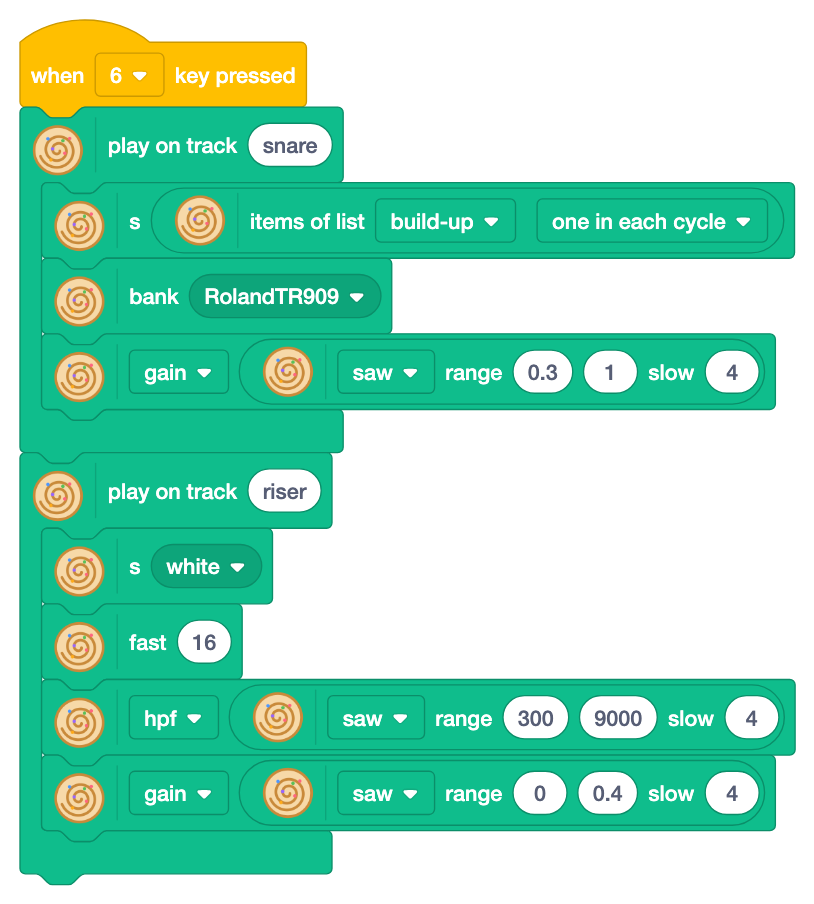
The part which lifts the mood before the chorus is the build-up.
- snare: the list "build-up" goes
sd*4→sd*8→sd*16→sd*32, twice as fast every bar.gain(volume) withsaw range .3 1 slow 4makes it louder and louder (a saw wave goes up slowly, then drops at once). - riser:
white(white noise) is a hiss. Raisinghpf(high-pass filter: cuts low sounds so it sounds thin) from 300 to 9000 makes a rising "whoosh".
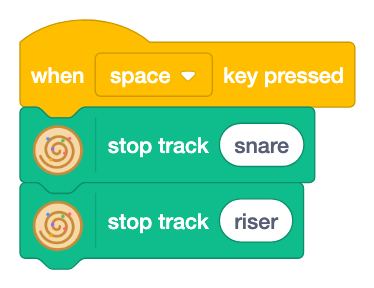
At the peak, press Space! The build-up stops and the other parts hit: the drop. The waves go around once in 4 cycles, so press it when they reach the top.
In Strudel
s("<sd*4 sd*8 sd*16 sd*32>").bank("RolandTR909").gain(saw.range(.3, 1).slow(4))
s("white*16").hpf(saw.range(300, 9000).slow(4)).gain(saw.range(0, .4).slow(4))
7. Pumping
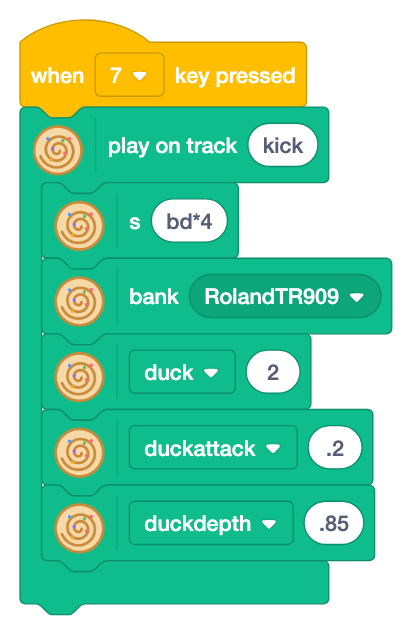
The biggest secret of EDM. On each kick, the other parts get quieter for a moment and come back, so the whole sound breathes. Producers call it "sidechain".
Orbits. Strudel sends sounds through "orbits", like lanes on a road. Sounds go through orbit 1 unless you choose another one. The orbit effect puts a part on another orbit (1 to 8). That is why the bass, the pad, the pluck and the lead have orbit 2: they all go through orbit 2. The kick stays on orbit 1.
duck. The duck effect (duck your head: make other sounds quieter) chooses which orbits get quieter on each sound. duck 2 makes orbit 2 quieter on each kick. To duck several orbits, write them with :, like 2:3:4.
duckattack: how long the ducked sound takes to come back (in seconds)..2is a short "whoo".duckdepth: how much quieter, from 0 (no ducking) to 1 (silent).
The track name is the same "kick", so 7 replaces the plain kick. Press 1 and 7 a few times and compare.
In Strudel
s("bd*4").bank("RolandTR909").duck("2").duckattack(".2").duckdepth(".85")The build-up snare and the riser stay on orbit 1, so they do not get quieter.
Next: code
Play all parts and use "open all tracks in strudel.cc" (see the column) to turn this song into Strudel code. Change one number at a time and press Ctrl+Enter. Add .hush() at the end of a part to mute it.
In the next step, step 14, you try techniques which make a four-on-the-floor rhythm cool.
14Beyond four on the floor: make the rhythm cool
You can make four on the floor, but it sounds a bit flat? Do not drop it: add things on top, little by little. In house and techno the kick stays four on the floor all the time. The cool part comes from what is around it: offsets, loud and soft, movement and change.
In this step you add techniques one by one to the house beat and hear what each one changes. The tempo is 124 BPM, and the stage shows a punch card, where you can see where the drums play.
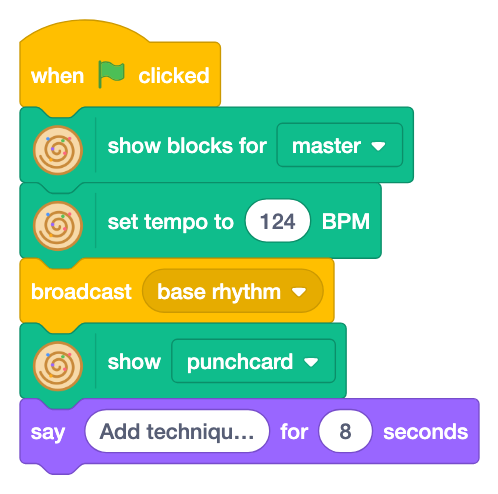
| Key | Technique | Key | Technique |
|---|---|---|---|
| 1 | Loud and soft | 6 | Open the filter slowly |
| 2 | Off-beat bass | 7 | Drop at random |
| 3 | Ghost notes | 8 / 9 | Break / drop |
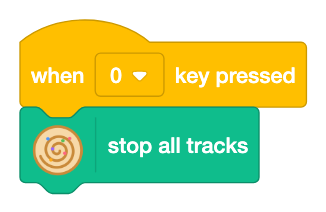
| 4 | Offset with euclid | Space | Back to the base rhythm |
| 5 | Fills | 0 | Stop everything |
The base rhythm: house four on the floor
![When base rhythm is received, stop all tracks and play kick bd*4, hats [~ oh]*4 and clap [~ cp]*2 with the TR909](../tutorial/en/step14-2.png?v=a092ce28)
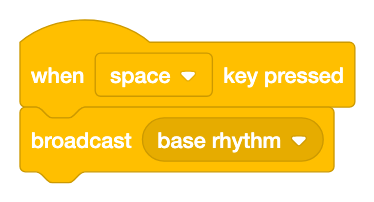
The kick plays on every beat with bd*4, the open hat between the beats (on the off-beats) with [~ oh]*4, and the clap on beats 2 and 4 with [~ cp]*2. Each drum has its own track, so a technique can change or add one track at a time. Space always brings you back here.
In Strudel
$: s("bd*4").bank("RolandTR909")
$: s("[~ oh]*4").bank("RolandTR909")
$: s("[~ cp]*2").bank("RolandTR909")
1. Loud and soft
![Key 1 plays on track ticks: s hh*16, gain [.2 .6]*8 and bank RolandTR909](../tutorial/en/step14-3.png?v=a9f17a45)
Sixteenth-note hats go on the track "ticks". A pattern in gain, [.2 .6]*8, makes them soft and loud in turns. All at the same loudness sounds like a machine; with loud and soft, it sounds like a person playing.
In Strudel
s("hh*16").gain("[.2 .6]*8").bank("RolandTR909")Try it: change [.2 .6]*8 to [.2 .2 .6 .2]*4 for fewer loud hits and another feel.
2. Off-beat bass
![Key 2 plays on track bass: note [~ c2]*4, s sawtooth and lpf 600](../tutorial/en/step14-4.png?v=ebc43f62)
The kick plays on the beats, so the bass goes between them, on the off-beats. The low sounds do not clash, so both are clear and they bounce: boom, bass, boom, bass. It is the same idea as the off-beat bass of step 13.
In Strudel
note("[~ c2]*4").s("sawtooth").lpf(600)Try it: change [~ c2]*4 to <[~ c2]*4 [~ g1]*4> to change the note every bar.
3. Ghost notes
![Key 3 plays on track snare: s [~ sd]*2, a stack with s sd, beat 7,9,14 16 and gain .2, and bank RolandTR909 below](../tutorial/en/step14-5.png?v=0c51c0fd)
Very soft snares (gain .2) hide between the usual snares. You hardly hear them, but they add a small swing to the rhythm. They are hidden like ghosts. The blocks in the stack change only the sound in it; the bank below changes all of them.
In Strudel
stack(s("[~ sd]*2"), s("sd").beat("7,9,14", 16).gain(".2")).bank("RolandTR909")Try it: set the gain of the ghosts to .5 and hear the difference.
4. Offset with euclid
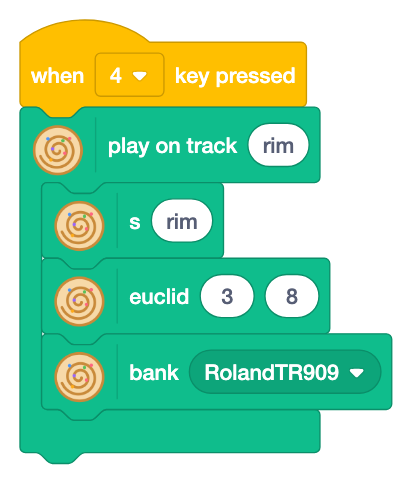
Three sounds spread as evenly as possible on eight steps make an offset rhythm of 3, 3, 2. Stacked on the straight four on the floor, it adds a catch that makes you move.
In Strudel
s("rim").euclid(3, 8).bank("RolandTR909")Try it: change 3 8 to 5 8 or 7 16.
5. Fills
![Key 5 plays on track clap: s [~ cp]*2, every 4 ply 2 and bank RolandTR909](../tutorial/en/step14-7.png?v=75664909)
Once in four cycles, each clap plays twice. The ear gets bored when nothing changes; a change now and then marks a section. It takes the place of the track "clap".
In Strudel
s("[~ cp]*2").every(4, x => x.ply(2)).bank("RolandTR909")Try it: change "ply 2" to "fast 2" or "rev".
6. Open the filter slowly
![Key 6 plays on track bass: note [~ c2]*4, s sawtooth and lpf with sine range 200 3000 slow 8](../tutorial/en/step14-8.png?v=1849aad1)
A wave in lpf changes the sound from dull to bright and back over eight cycles. The same loop sounds exciting when the sound moves. It takes the place of the bass of 2.
In Strudel
note("[~ c2]*4").s("sawtooth").lpf(sine.range(200, 3000).slow(8))Try it: change the shape of the wave to saw, which gets brighter and then drops back.
7. Drop at random
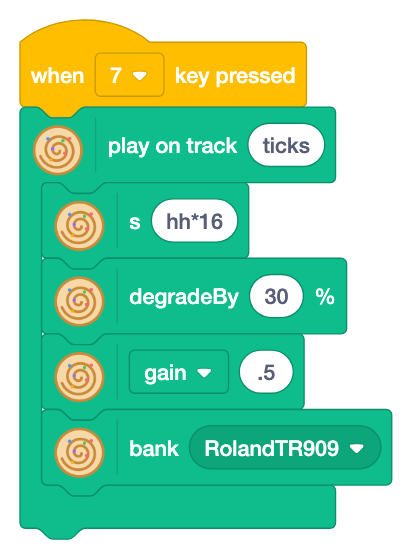
30% of the sixteenth-note hats are dropped at random. Each cycle is a bit different, so the loop sounds alive. It takes the place of the ticks of 1.
In Strudel
s("hh*16").degradeBy(0.3).gain(".5").bank("RolandTR909")Try it: change 30 to 60 for more gaps.
8. Break and drop
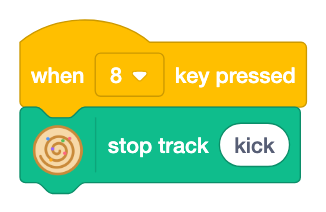
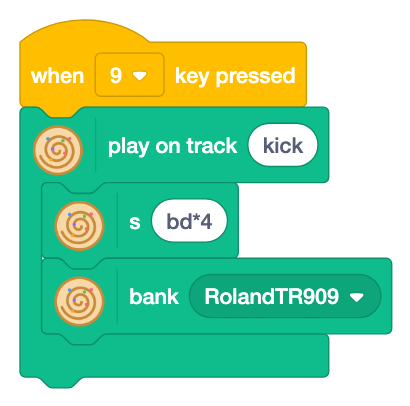
Key 8 stops the kick (break) and key 9 brings it back (drop). While the kick is gone, the ear waits for it, so its return is exciting. The longer the break, the better the drop. Press 8, wait four cycles, then press 9; next time wait eight cycles and compare.
Next: the rhythm book
The techniques work on other rhythms too. The rhythm book has eight standard rhythms, such as disco, boom bap, trap, drum and bass and reggaeton. Add these techniques to a rhythm you like and make it your own song. Pumping, where the kick pushes the other sounds down, and the build-up are in step 13.